Christmas Lures Being Distributed Via Spam

Websense® Security Labs™ ThreatSeeker™ Network has discovered that malware authors are already using Christmas themes this year as a social engineering tactic, in an effort to gain control over compromised machines. This campaign uses email messages in the form of e-greetings, leading to supposed animated postcards. These actually lead to a Trojan backdoor that has been distributed in previous malicious spam campaigns.

The email messages, spoofed to appear as though they have been sent from postcards.org, display an animated Christmas scene. A URL link within the email leads to a malicious file called postcard.exe hosted on various servers.

Once executed, a backdoor is created by the malware author enabling access and control over the resources of the compromised machine. During the install process an image called xmas.jpg is displayed to the user as a distraction technique.

Example of malicious email:

Thanksgiving

I’d like to give thanks to all of you who have honored me by following my tips here on my blog. Today’s entry will be a little different…It’s all about Thanksgiving.

Thanksgiving Trivia

Here are some interesting facts about Thanksgiving that each of us should know about:

  • The first Thanksgiving celebration can be traced back to the Plymouth Pilgrims in the fall of 1621.
  • The first Thanksgiving feast was held to thank the Lord for sparing the lives of the survivors of the Mayflower, who landed at Plymouth Rock on December 11, 1620. The survivors included four adult women and almost forty percent children.
  • The Wampanoag chief Massasoit and ninety of his tribesmen were also invited to the first thanksgiving feast. Governor William Bradford invited them for helping the Pilgrims surviving and teaching them the skills of cultivating the land.
  • The celebration in 1621 lasted for three days and included games and food.
  • The president to proclaim the first ‘National Day of Thanksgiving’ in 1789 was George Washington.
  • Sarah Josepha Hale, a magazine editor, campaigned to make Thanksgiving a National Holiday in 1827 and succeeded.
  • Abraham Lincoln announced Thanksgiving to be national holiday in his proclamation on October 3, 1863.
  • The ‘wishbone’ of the turkey is used in a good luck ritual on Thanksgiving Day.

The President’s Pardon

The animal lovers determined to counter the animal sacrifice introduced the custom of letting a turkey, pardoned by the President of the United States, free to live a natural life comfortably in a zoo at Herndon. This pardon is given at the last minute before the execution of the Turkey in a ceremony at the White House. Here we reiterate the words of the official pardon:

“By virtue of this pardon, (Turkey of the year’s name) is on her way not to the dinner table but to Kidwell Farm in Herndon, VA. There she’ll live out her days as safe and comfortable as she can be.”

It is said that this tradition was first observed in 1947 and was conceived by Harry Truman. After the Turkey gets the Presidential Pardon, it is transported to Kidwell Farm, a petting zoo at Frying Pan Park in Herndon, Virginia to be welcomed as the chief guest along with the President in a Turkey ‘Roast’ celebration. Here, the Turkey is not ‘roasted’ in the oven but through humor and turkey jokes.

And then, there’s the most important site of all on Thanksgiving – Butterball’s website(http://www.butterball.com/tips-how-tos/tips/thanksgiving-guide), for when you need help with what’s going on.

However, when things go wrong with the food, you can find some quick fixes at http://www.chefrick.com/thanksgiving-food-first-aid/

Enjoy your Thanksgiving, and thank you…

Avoid Online Scams When You’re Shopping for the Holidays

From Trend Micro TrendSetter

Every year we see staggering new statistics about how many people are buying gifts online instead of braving traffic, long lines, and parking nightmares at brick-and-mortar stores. During the holidays, many online retailers will also offer breaks on shipping costs—so the advantages of less physical hassle, no sales tax, and potentially free or cheap shipping make online shopping pretty appealing. However, the risks involved in online shopping are persistent as ever. Here are a few key ways you can protect yourself.

1. Use a virtual account number. This is a service that most credit cards now offer. Here’s how it works: Log onto your credit card account and with one click you can generate a random credit card number that makes it virtually impossible for anyone to steal your account number while shopping online. When your virtual number is generated, simply enter it into the merchant’s form and complete your purchase without revealing your actual card number. This virtual credit card number is only valid for a short period of time-long enough for the retailer to process your transaction, which will be charged to your real credit card account. But if a retailer stores that number and a hacker later breaks into their system, the number will be useless. Please note: Virtual account numbers cannot be used for purchases that require you to show your credit card at time of pick-up (e.g., movie tickets, etc.), because the account numbers will not match.

2. Make sure you’re shopping on a secure site. Look for the padlock icon or a URL that starts with https://. That means your transaction is encrypted.

3. Don’t trust emails from “retailers” claiming you need to verify your credit card information. This is almost certainly a scam. Every year millions of emails go out from hackers pretending to be eBay or PayPal customer service and asking consumers to provide information that the actual service already possesses. If you’re worried that a retailer really has failed to process your order, go to the site and look up your account or contact their customer service center—don’t click on a link in email that could redirect to a dummy site.

Block sales calls to your cell phone

The following article is reprinted from PCWorld.com

Telemarketing is especially annoying when it reaches your mobile phone, costing you money to hear a sales pitch. Be cautious in giving your mobile number to companies, and especially be aware of opting in or out of a company sharing or selling that information.

If you do give out a mobile number, be sure to tell companies that it’s mobile. If someone calls with a pitch, ask them to take you off their list, and also mention that they have called a mobile number. It’s illegal for telemarketers to use autodialers to reach mobile numbers, so they’ll likely respond quickly if you let them know.

The National Do Not Call Registry can add another layer of protection, with caveats. The list is a database of numbers that telemarketers can’t call, but loopholes allow calls from political groups, surveys, and companies with which you’ve established a business relationship. Nearly the same restrictions on sales calls apply to mobile phones already; however, if you’ve begun to receive sales calls on your cell phone, adding your number to the Do Not Call Registry (www.donotcall.gov)can be the easiest way to stop them.

If, after registering your number with the Do Not Call Registry, you continue to receive sales calls on your cell phone, don’t just hang up in exasperation. Instead, gather as much info about the caller as you can, and file a complaint using the online form at donotcall.gov

iPhone Charger Recall

Apple has recalled the ultracompact USB adapters sold with its 3G iPhones, warning that the metal prongs could break off and put owners at risk of electric shock. Apple has urged owners to recharge the phone by connecting it to a computer until they can trade in the faulty charger for a new one. They can initiate such a trade either in person at an Apple Store or through Apple’s Web site, http://www.apple.com/support/usbadapter/exchangeprogram/.  (From PCWorld Magazine)

Windows Updates – How can I choose what to install?

Microsoft introduced the concept of Patch Tuesday a few years ago. The idea is that security patches are accumulated over a period of one month, and then dispatched all at once on the second Tuesday of the month. Windows Update is a service that provides updates for the operating system and its installed components. Microsoft Update is an optional feature that can be enabled to provide updates for other Microsoft software installed on a Windows computer, such as Office. These updates can come anytime throughout the month.

If your computer is setup to automatically download and install updates, you will get any and all updates and patches, both good and bad. By default, the automatic settings will check for updates at 3:00 in the morning, every morning. If you turn your computer off at night, it never has a chance to check for updates so if you want to keep the automatic settings, you should change the settings to a time when you know the computer will be on. To change the settings, open the Control Panel and double click on Security Center. At the bottom, you can choose to manage settings for Automatic Updates.

My recommendation is to change the setting to the second option, which is to download the updates but let me choose when to install them. What happens then is that the updates will download and there will be a yellow shield down on the right by the clock. When I double click on it, I will have the option for an “Express Install” or a “Custom Install”. I always choose the custom install. That choice lets me pick which updates and patches to install.

I will always install security patches and program patches, but I never install new service packs when they’re first available. I’ll uncheck those and install the rest. I’ll continue to uncheck them until I know they are safe to install.

Just to be clear, when I see that shield, I will always check what’s downloaded and install what’s appropriate. The bad guys out there wait for the patches to come out also so they can create programs that hit all computers that aren’t patched. Lately, that attack will come the day after the patches are released so it is very important to install them.

Every so often, you will get a notice from another program, such as Adobe, that it has an update available. Should you install those as well? I’d say yes, since virus writers look for holes in most of the popular programs that people will have on their computers and will attack those programs as well.

I know it’s a hassle to do these updates, but do them since it’s more of a hassle cleaning an infected computer.

NOTE: One other important matter; create a system restore point before doing any updates. That way, if an update messes up the computer, you’ll be able to restore it to the point just before you did the updates. For instructions on creating a restore point in Vista, click here, For XP, click here. You can download a great document from Microsoft for securing your Vista computer here.

The Holidays are Coming

With the holidays right around the corner, it’s time to start looking at what’s out there for specials. The following are a few websites I frequent this time of year, and those that offer email subscriptions, I sign up for so I get updates on deals as they come up. These sites are pretty safe to sign up on but when I do subscribe to a site I’m not sure of, I may use a temporary or disposable email addresses. That way, if I start getting a lot of spam from one of them, I just delete that email address. I use the service by GishPuppy (http://www.gishpuppy.com).

With Black Friday coming, here are a few deal sites: http://blackfriday.gottadeal.com/, http://bfads.net/, and http://dealnews.com/ – Where Every Day is Black Friday

http://slickdeals.net/ is a site where you’ll find every day discounts as is http://www.techbargains.com/

http://www.woot.com/ is a site I watch daily because they only sell one item per day until it is sold out or until 11:59pm central time when it is replaced. Sometimes you get some great deals here.

If you have any deal sites that you like, please let me know and I’ll add them to the list.

With finances the way they are, you’ll find some wonderful deals at these sites. As always, when ordering online, be careful that you are on a secure site before entering any credit card information. Take a look at the address bar at the top of the screen and look for an “https://” instead of the normal “http://” Also, look for the “lock” icon. It’s at a different place for different browsers but it should always be there. Click (or double-click) on it to see details of the site’s security.  This is important to know because some fraudulent web sites are built with a bar at the bottom of the web page to imitate the lock icon of your browser!  Therefore it is necessary to test the functionality built into this lock icon.

How to maintain your computer

Over time, with use, your computer will start slowing down and mis-behaving. It’s a given. There are a few programs that I use regularly to help maintain my computer. The first program, CCleaner (http://www.ccleaner.com/download), will scan your computer and allow you to get rid of all of the “junk” files that accumulate. CCleaner is a freeware PC optimization tool. It combines a system cleaner that removes unused and temporary files from your system and also a fully featured registry cleaner. You’ll need to run it in phases as the disk cleaner is separate from the registry cleaner. Also, the disk cleaner will clean out your browser history and cookies unless you uncheck the boxes. If it deletes your cookies, you’ll have to enter username and password when you go to websites that you’ve logged into in the past. The registry cleaner allows you to backup your registry before it fixes issues. Make sure you do so (it’s part of the process) just in case something happens, but I’ve never really had anything go wrong. I run this program every couple of weeks.

After running CCleaner, I’ll usually run a defrag program to clean up all of the empty space on the hard disk. The program I run for this is from Auslogic. You’ll find the download here – http://www.download.com/Auslogics-Disk-Defrag/3000-2094_4-10567503.html?part=dl-Auslogics&subj=dl&tag=button&cdlPid=10857004. By running this program, your hard disk will run smoother and will last longer. After it finishes running, it will tell you it can delete a large number of “junk” files and then prompt you to purchase a license. Don’t. You can do the same thing with CCleaner and Windows own Disk Cleaner.

If you have 1 GB or less of RAM memory, not hard disk space, I’d recommend adding an additional 1 to 2 GB. Memory is cheap and it will make a world of difference in how the programs run on your computer.

Make sure that your hard disk never gets more than 90% full. It’s easy to fill a hard drive with pictures, music and videos so keep an eye on the available space. If it gets too full, it will start to break down.

I also scan my hard drive with a program that searches for spyware. I actually use 2 programs; Spybot (http://www.safer-networking.org/en/download/) and Adaware (http://www.lavasoft.com/single/trialpay.php). They’ll both find things the other misses so it’s good to run them both.

The other thing to look at is what programs are running in the background. Most of the time, they’ll add an icon to the taskbar on the bottom right by the clock. There are usually some programs that don’t need to be running all of the time. CCleaner can help out here as well. Under the “Tools” button, you can see what’s in your startup and delete the items you don’t need. If you’re not sure what an item is, you can run it through a search engine to find out if it’s necessary. All programs that are running in the background are using memory that can be better used running other programs.

If you have any questions about any of this, add a comment and I’ll answer back.

Bank Failures, Mergers and Takeovers: A “Phish-erman’s Special”

FTC Consumer Alert

Bank Failures, Mergers and Takeovers: A “Phish-erman’s Special”

If the recent changes in the financial marketplace have you confused, you’re not alone. The financial institution where you did business last week may have a new name today, and your checks and statements may come with a new look tomorrow. A new lender may have acquired your mortgage, and you could be mailing your payments to a new servicer. Procedures for the banking you do online also may have changed. According to the Federal Trade Commission (FTC), the nation’s consumer protection agency, the upheaval in the financial marketplace may spur scam artists to phish for your personal information.

To read the complete article, visit http://www.ftc.gov/bcp/edu/pubs/consumer/alerts/alt089.shtm

Anyone up for a little phishing?

Yes, I spelled that right. Phishing is the act of sending an e-mail to a user falsely claiming to be an established legitimate enterprise in an attempt to scam the user into surrendering private information that will be used for identity-theft. The e-mail directs the user to visit a web site where they are asked to update personal information, such as passwords and credit card, social security, and bank account numbers, that the legitimate organization already has. The Web site, however, is bogus and set up only to steal the user’s information. Phishing mail often includes official-looking logos and other identifying information taken directly from legitimate Web sites, and it may include convincing details about your personal information that scammers found on your social networking pages.

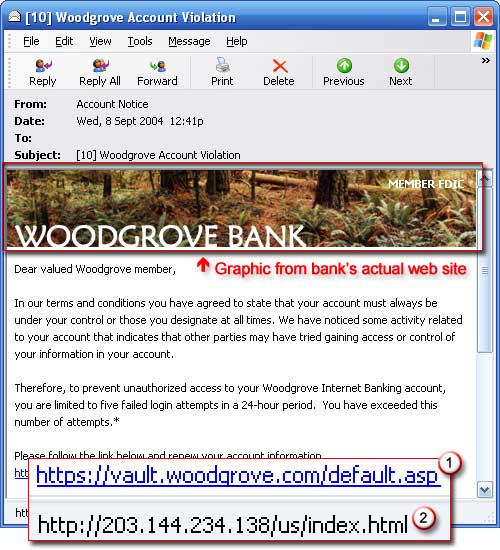
The following is a sample e-mail. As you can see, it’s not obvious at first that this is a fake. It has the bank’s logo at the top and looks legitimate but what gives this one away is the link at the bottom. The posted link (1) shows the real site but if you click on that link you’ll be taken to the site of the 2nd link (2), which is the scam site.

Fake E-mail

Fake E-mail

How can you be sure about the accuracy of a link? In just about every e-mail that has a link, when you hover your mouse arrow over the link without clicking, a pop-up window will show you the actual site that you will be taken to if you click on the link. If it doesn’t match the link shown, be wary.

So what do you do if you get an email that looks legitimate but is asking for you to click on a link to enter personal information or verify your personal information? Don’t click on the links within emails that ask for your personal information. Fraudsters use these links to lure people to phony Web sites that look just like the real sites of the company, organization, or agency they’re impersonating. If you follow the instructions and enter your personal information on the Web site, you’ll deliver it directly into the hands of identity thieves. To check whether the message is really from the company or agency, call the company directly or go to its web site by typing the real address in your browsers address bar, but never click on the link.