Adobe confirms PDF zero-day attacks. Disable JavaScript now | Zero Day | ZDNet.com

Adobe confirms PDF zero-day attacks. Disable JavaScript now | Zero Day | ZDNet.com.

[UPDATE:  Adobe plans to patch this issue on January 12, 2010 ]

Malicious hackers are exploiting a zero-day (unpatched) vulnerability in Adobe’s ever-present PDF Reader/Acrobat software to hijack data from compromised computers. According to an advisory from Adobe, the critical vulnerability exists in Adobe Reader and Acrobat 9.2 and earlier versions.  It is being exploited in the wild.

We can tell you that this exploit is in the wild and is actively being used by attackers and has been in the wild since at least December 11, 2009. However, the number of attacks are limited and most likely targeted in nature. Expect the exploit to become more wide spread in the next few weeks and unfortunately potentially become fully public within the same timeframe. We are fully aware of all the details related to the exploit but do not plan to publish them for a few reasons:

  1. There currently is no patch or update available that completely protects against this exploit.
  2. There is little to no detection of these malicious PDF files from most of the major Antivirus vendors.

With that said we can tell you that this vulnerability is actually in a JavaScript function within Adobe Acrobat [Reader] itself. Furthermore the vulnerable JavaScript is obfuscated inside a zlib stream making universal detection and intrusion detection signatures much more difficult.

In the interim, Adobe PDF Reader/Acrobat users are urged to immediately disable JavaScript:

Click: Edit -> Preferences -> JavaScript and uncheck Enable Acrobat JavaScript

Or, better yet, use an alternative PDF Reader software program.

HUGE VIRUS COMING ! PLEASE READ & FORWARD !

Just a note – I posted this in 2009 at this time and I see it’s going around this year again. The e-mail that touts this virus is a hoax.

With a subject line like that, how could I ignore it? I received an e-mail from a friend who asked if this was real? According to the message, Norton, Snopes, CNN, Microsoft and McAfee are all legitimizing this so it must be true, right? Well, in this case, it’s partially right in that it’s a warning to be careful. However, there are a lot of scare tactics used which should tell you that the content isn’t true. Read the e-mail message below and I’ll explain myself afterwards.

Hi,

A check made with Norton Anti-Virus indicates that they are gearing up for this virus!

Snopes was checked as well, and it is for real. Get this E-mail message sent around to all your contacts ASAP.

PLEASE FORWARD THIS WARNING AMONG YOUR FRIENDS, FAMILY AND CONTACTS!

You should be alert during the next few days. Do not open any message with an attachment entitled ‘POSTCARD FROM HALLMARK,’ regardless of who sent it to you. It is a virus which opens A POSTCARD IMAGE, which ‘burns’ the whole hard disc C drive of your computer.

This virus will be received from someone who has your e-mail address on his/her contact list. That is the reason why you need to send this e-mail to all your contacts. It is better to receive this message 25 times than to receive the virus and open it!

If you receive a mail called’ POSTCARD,’ even if it is sent to you by a friend, do not open it! Shut down your computer immediately. This is the worst virus announced by CNN.

It has been classified by Microsoft as the most destructive virus ever. This virus was discovered by McAfee yesterday, and there is no repair yet for this kind of virus. This virus simply destroys the Zero Sector of the Hard Disc, where the vital information is kept.

COPY THIS E-MAIL, AND SEND IT TO YOUR FRIENDS.
REMEMBER: IF YOU SEND IT TO THEM, YOU WILL BENEFIT ALL OF US

In this case, it says the virus will be delivered via an electronic card.  One of the ways that malware can get onto a computer is by clicking on a link or opening an attachment in an e-mail that will then download and try to install the payload. One way that the malware writers try to get you to click on the link is by making it look like it’s an e-card from a friend or family member. That’s been going on for sometime. So, that being said, you need to be careful anytime/everytime you think about clicking on a link in an e-mail, especially if it’s an e-card greeting. Legitimate greetings will tell you to go to a website and enter a code to see the greeting so you won’t have to click on a link.

Any time you get an e-mail message telling you to pass it on to everyone you know, especially since everyone is preparing for it and Snopes says it’s true (even though in this case Snopes really doesn’t even discuss it), question it. Go to an antivirus website and check their “hot” virus list. Mcafee’s Threat Center, Symantec Threat Explorer, US Government Threat Center will let you know what’s the current threats are. Then, you can decide whether to pass it on to everyone in your contacts or not.

Consider this with any message that you get “to pass on”. There was a warning from people about Facebook letting Google index everything about you starting that day. I saw the warning in several e-mails, a couple of groups and on Facebook.  I little detective work showed that Facebook had actually been doing that for the past 2 years, but not with “everything”, only with what the user has designated to be shared to everyone. What is set to be seen by only friends doesn’t and won’t be indexed.

So, if you receive a warning, take it as such and check the validity. Feel free to e-mail me and I’ll let you know if it’s legitimate or not and if so, what you need to do to protect yourself. Comments?

Is It Disk or Disc?

This has been something that has confused me for some time. Come to find out that I’ve been using the right word all along.

Maybe you’ve assumed that discs and disks are just two different ways to spell the same thing. In a new support article, Apple Computer explains that disc refers to optical media – CDs, DVDs, etc where as disk is your computer’s hard disk or floppy disk.

So, there you go. When you need to use one of these words while writing, you’ll now know which is which.

Windows Black Screen of Death: What You Need to Know – PC World

Windows Black Screen of Death: What You Need to Know

Brennon Slattery

Dec 1, 2009 6:40 am

Any Windows owner is familiar with the Blue Screen of Death, that much-dreaded white text on a blue background that essentially says you're through. But what you may not know is that there's a new contender in town: the Black Screen of Death. So what is this horrible-sounding thing, where did it come from, what's being done to fix it, and how bad is it? Here are five things you need to know about the Black Screen of Death.

It stems from Microsoft security updates

After the latest Microsoft patch was delivered on Tuesday, November 10, 2009, users began reporting a crippling black screen. The Black Screen of Death causes your PC to seize up and removes everything except, in some cases, a single open My Computer window. So what happened?

Microsoft apparently made changes to the Access Control List (ACL), a list of permissions for a logged-on user. The ACL interacts with registry keys, creating visible desktop features such as a sidebar. However, the latest patches appear to make some changes to those registry keys. The effect is that some installed applications aren't aware of the changes and don't run properly.

It's not Windows 7-specific

Windows 7 haters: step back. The Black Screen of Death isn't relegated to Microsoft's latest OS. Security firm Previx states that the Black Screen of Death can affect Windows XP, Vista, and Windows 7 without prejudice. So if you're considering uninstalling Windows 7, fearful that it is the source of the problem, don't bother. You won't dodge any bullet.

Microsoft is investigating

Gotta give it to Microsoft: It has a clever way of neither confirming nor denying the existence of a PC illness. In an e-mail statement obtained by PC World yesterday, a company spokesperson wrote: “Microsoft is investigating reports that its latest release of security updates is resulting in system issues for some customers. Once we complete our investigation, we will provide detailed guidance on how to prevent or address these issues.”

So does it exist or not? Yes it does. But Microsoft won’t say for absolutely positively certain until it has finished investigating. That’s when they broadly release a fix for the issue and maybe, if we’re lucky, apologize for the inconvenience.

Security firm Prevx has a fix

Prevx, a UK security company that first discovered the issue, released both step-by-step instructions and a download to eliminate the Black Screen of Death. For those who like (and are capable of) popping open the hood of their PC, you can also modify registry settings, though this doesn’t come recommended if you’re unfamiliar with the guts of a Windows machine.

Not as bad as Blue Screen of Death

So how powerful is this beast? Does it compare to the Blue Screen of Death? Nope — they are entirely different problems. The Blue Screen of Death represents a hardware or driver failure, meaning something is wrong deep within the computer. The Black Screen of Death has relatively easy fixes and doesn’t necessarily mean there is something physically wrong with your equipment.

By now some of you may be sick to death of problems stemming from Microsoft and want a clean slate. Here’s how to wipe your PC clean and start from scratch. It may not necessarily be the solution to your problem, or problems, but it can be a gush of therapeutic refreshment to eliminate (most) everything that’s wrong with your computer.

Stay tuned to catch Microsoft’s official fix as soon as it is released.

via Windows Black Screen of Death: What You Need to Know – PC World.

Never forget to back up your files ever again. Now it’s easy and automatic.

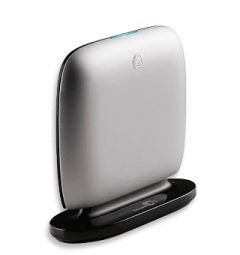
Seagate® Replica™

* Back up your entire computer automatically.
* Take the work and maintenance out of backup.
* Have easy, instant access to accidentally deleted files.
* Effortless, automatic backup for everything on your PC, including the operating system, programs, and settings.
* No tedious installation, nothing to configure.
* Up to 250GB capacity for single PC and 500 GB for multiple PCs.
* USB 2.0.

Every file is perfectly safe.

From a little mistake to a major catastrophe, your files will always come back.

* Easily retrieve accidentally deleted files.
* Restore your entire system in the event of a PC crash.

No maintenance. No hassle.

There’s nothing to forget to do. So everything is always safe.

* Password protection ensures that only you have access to your computer’s backed up files.
* Replica automatically removes the oldest versions of files to free space.
* Five-year limited warranty.
* Multi-PC version includes a convenient vertically standing dock.

Weighing in at less than a pound and only slightly larger than a pack of cards, this featherweight device manages to pack quite a punch.

The Replica comes with bare-bones software and strikes a good balance between peace of mind and individual-user control. Seagate provides a USB 2.0 cable, recovery guide and recovery CD.

After the hard drive is plugged in, it checks for updates to the Replica software, downloads the most current version and starts mirroring your computer’s content. The startup process is short, taking only a couple of minutes, though the actual backup is a time-gobbling endeavor taking about 4 hours to transfer 130 GB of data. A blue light on the top of the Replica’s case blinks continuously while data is being transferred, making it easy for you to go about your other business while it works in the background. It’s also stealthy for a hard drive, emitting only a quiet whir when working at full speed.

http://www.seagate.com/www/en-us/products/external/replica/

replica_right_01_320x340.png

Shop online? You may have been ripped off – OC Watchdog : The Orange County Register

Shop online? You may have been ripped off

November 18th, 2009, 12:06 pm · posted by Teri Sforza, Register staff writer

So you’re booking your flight, or ordering your movie tickets, or paying for your pizza online. It’s a mainstream web site. No worries.

You type in your credit card information, click the “purchase” button, and enjoy your flight/movie/pizza. But a few months later, mystery charges of $10 to $20 a month appear on your bank statement, for membership in a club you have no memory of joining.

Surprise! You’ve been a victim of consumer fraud – thanks to that web site you trusted.

The practice is pervasive, and has cost unsuspecting consumers $1.4 billion, according to “Aggressive Sales Tactics on the Internet and Their Impact on American Consumers,” an investigative report released Tuesday by the U.S. Senate Committee on Commerce, Science, and Transportation. (You can read the full report here: online-ripoffs; and can find supporting documents here.)

Companies named in the report – and apparently profiting on the scam – include 1-800-Flowers.com, Inc.; AirTran Holdings, Inc.; Classmates.com, Inc.; Continental Airlines, Inc.; FTD, Inc.; Fandango, Inc.; Hotwire, Inc.; Intelius, Inc.; MovieTickets.com, Inc.; Orbitz Worldwide, Inc.; Pizza Hut, Inc.; Priceline.com, Inc.; Redcats USA, Inc.; Shutterfly, Inc.; US Airways Group, Inc.; and VistaPrint USA, Inc. (But that’s not all of them; there are many, many, many more.)

How does the scam work? Consider the experience of Chris Steffen of Los Angeles, who bought movie tickets through Movietickets.com in April 2007.

“I‘m not sure how or when this happened and I‘m sure part of it is oversight or my own fault,” Steffen wrote in a complaint. ”But somehow through the purchasing of movie tickets through your site I was signed up for Reservation Rewards and charged 10 dollars a month membership for multiple months. This means that when I ordered tickets through your service, the cost to me was not only the price of the tickets, but the inadvertent cost of being enrolled in a service plan I was not aware of.”

Read the rest of the article here –  Shop online? You may have been ripped off – OC Watchdog : The Orange County Register.

Apple voids warranties over cigarette smoke, users say • The Register

Apple voids warranties over cigarette smoke, users say

No repairs for “biohazard” Macs

By Cade Metz in San Francisco

Posted in PCs & Chips, 22nd November 2009 06:13 GMT

A Mac user claims that Apple voided her warranty and refused to repair her machine because it was “contaminated” with cigarette smoke.

The claim mirrors a similar report from last year, when another user complained that the Jobsian cult wouldn't service a system due to the “health risks of secondhand smoke.”

Both complaints arrive by way of The Consumerist, a site obsessed with consumer empowerment. According to the site, the claims come from separate parts of the country and were reported more than a year apart.

In each case, the site says, an Apple service center agreed to repair a machine before telling the owner repairs were not possible because the system contained some sort of smoke residue. “They informed me that his computer can't be worked on because it’s contaminated,” wrote one woman in a complaint about Apple’s treatment of the iMac her son used.

“When I asked for an explanation, she said he’s a smoker and it’s contaminated with cigarette smoke which they consider a bio-hazard! I checked my Applecare warranty and it says nothing about not honoring warranties if the owner is a smoker. The Applecare representative said they defer to the technician and my son’s computer cannot be fixed at any Apple Service Center due to being listed a bio-hazard.”

Indeed, the warranty does not include mention of either secondhand smoke or biohazards. It does say that the plan does not cover “damage to the covered equipment caused by…extreme environment,” but both Consumerist claims indicate systems failures weren’t necessarily related to smoke residue. One user even says that smoke residue was falsely identified.

Both users appealed directly to the office of Steve Jobs. According to one, the office confirmed that the cult would not repair machines showing signs of smoke residue. “[A person from Jobs’ office] did advise me that nicotine is on OSHA [Occupational Safety and Health Administration]’s list of hazardous substances and Apple would not require an employee to repair anything deemed hazardous to their health,” the user said.

Apparently, the Jobsian office worker contacted the Apple Store in question to see about a possible repair – before calling back to say it was out of the question. “[The worker] called me earlier this week to deliver the ‘bad news.’ She said that the computer is beyond economical repair due to tar from cigarette smoke! She said the hard drive is about to fail, the optical drive has failed and it isn’t feasible to repair the computer under the warranty.

“This computer is less than 2 years old! Only one person in my household smokes – one 21 year old college student. She said that I can get it repaired elsewhere at my expense. I asked why my warranty didn’t cover the repair and was told it’s an OSHA violation.”

via Apple voids warranties over cigarette smoke, users say • The Register.

Online Holiday Shopping Tips

The holiday season is approaching quickly and many of us will be shopping online. It’s important that consumers understand the potential security risks and know how to protect themselves and their information.
The following tips are provided to help promote a safe, secure online shopping experience:

  • Secure your computer. Make sure your computer has the latest security updates installed. Check that your anti-virus/anti-spyware software is running and receiving automatic updates. If you haven’t already done so, install a firewall before you begin your online shopping.
  • Upgrade your browser. Upgrade your Internet browser to the most recent version available. Review the browser’s security settings. Apply the highest level of security available that still gives you the functionality you need.
  • Ignore pop-up messages. Set your browser to block pop-up messages. If you do receive one, click on the “X” at the top right corner of the title bar to close the pop-up message. If that doesn’t work, close your browser. Never accept a pop-up window’s notice that your computer is infected. That should only come from your installed and updated anti-virus program. What? You say you don’t have an anti-virus program? Read my previous post on that here.
  • Secure your transactions. Look for the “lock” icon on the browser’s status bar and be sure “https” appears in the website’s address bar before making an online purchase. The “s” stands for “secure” and indicates that the webpage is encrypted. Some browsers can be set to warn the user if they are submitting information that is not encrypted.
  • Use strong passwords. Create strong passwords for online accounts. Use at least eight characters, with numbers, special characters, and upper and lower case letters. Don’t use the same passwords for online shopping websites that you use for logging onto your home or work computer. Never share your login and/or password.
  • Do not e-mail sensitive data. Never e-mail credit card or other financial/sensitive information. E-mail is like sending a postcard and other people have the potential to read it.
  • Do not use public computers or public wireless to conduct transactions. Don’t use public computers or public wireless for your online shopping. Public computers may contain malicious software that steals your credit card information when you place your order. Criminals may be monitoring public wireless for credit card numbers and other confidential information.
  • Review privacy policies. Review the privacy policy for the website/merchant you are visiting. Know what information the merchant is collecting about you, how it will be used, and if it will be shared or sold to others.
  • Make payments securely. Pay by credit card rather than debit card. Credit/charge card transactions are protected by the Fair Credit Billing Act. Cardholders are typically only liable for the first $50 in unauthorized charges. If online criminals obtain your debit card information they have the potential to empty your bank account.
  • Use temporary account authorizations. Some credit card companies offer virtual or temporary credit card numbers. This service gives you a temporary account number for online transactions. These numbers are issued for a short period of time and cannot be used after that period. – Read a nice article here on the use of virtual credit cards. Additionally, PayPal offers free disposable credit cards numbers. You can read about that here.
  • Select merchants carefully. Limit your online shopping to merchants you know and trust. Confirm the online seller’s physical address and phone number in case you have questions or problems. If you have questions about a merchant check with the Better Business Bureau or the Federal Trade Commission.
  • Keep a record. Keep a record of your online transactions, including the product description and price, the online receipt, and copies of every e-mail you send or receive from the seller. Review your credit card and bank statements for unauthorized charges.

What to do if you encounter problems with an online shopping site:
If you have problems shopping online contact the seller or site operator directly. If those attempts are not successful, you may wish to contact the following entities:

the Attorney General’s office in your state
your county or state consumer protection agency
the Better Business Bureau at: www.bbb.org
the Federal Trade Commission at: www.ftc.gov/

For additional information about safe online shopping, please visit the following sites:

Dangerous “unpatchable” flaw discovered in Adobe Flash – TechSpot News

A newly discovered flaw in the Flash suite could put both users and servers at risk, according to some recent reports. Adobe has verified the hole, which lies inside any Flash-based application that allows people to upload their own content. Though some details are omitted, the flaw would allow someone to upload a malicious Flash object to a site, which in turn would be downloaded and processed by people visiting the site. According to one security expert, any site relying on user uploads through Flash could be vulnerable.

Adobe is contending that it is not entirely their issue. Other active scripting could also be made vulnerable, such as JavaScript or Silverlight, along with any site that relies on these to provide a mechanism for users to upload files. Because of that, Adobe said the problem is not fixable through a Flash update. Instead, it is on the shoulders of administrators whose servers use Flash. Adobe also suggests it is the responsibility of app developers to be security-minded and prevent this sort of thing from happening.

This isn’t the first severe flash flaw to emerge this year. Only a few months ago, a “critical” vulnerability was discovered and published. Earlier in the year, Adobe was tackling a host of other security issues with Flash as well. This newly-discovered vulnerability could prove to be the worst yet — and it doesn’t help that Adobe is claiming the flaw is “unpatchable”. A solution must be discovered, but it may be something that has to happen on a developer, browser or OS level instead of through Flash.

The only current defense users can employ against such attacks is to stop using Flash, or failing that, restrict its use to sites known to be safe with tools such as the NoScript add-on for Mozilla’s Firefox, or ToggleFlash for Microsoft’s Internet Explorer.

via Dangerous “unpatchable” flaw discovered in Adobe Flash – TechSpot News and
Flash flaw puts most sites, users at risk, say researchers

The “Noteable” Mousepad

Such a simple idea, but a wonderful one. Not sure if you have to wipe out the marks left by the mouse but if you keep your mouse to half of it, you can scribble on the other half and then just lift the top sheet to wipe it out and start again. And, it’s under $15.00

The Noteable Mousepad – http://www.quirky.com/products/9

Scratch-n-Scroll is a standard mousepad with an added writing surface. This mousepad is for all those times you are working at your desk and cant find a pen to jot down that phone number or list item you know you will forget later on.

Simply, write notes to yourself on your mouse pad using just the pressure from your finger or the built in plastic stylus as a “pen.” Cool thing is, just like your childhood toy the magic slate, you can erase the notes at any time simply by flipping up the semi-transparent top sheet.

Scratch-n-scroll maintains the slim portable design and scrolling surface you’ve come to expect of a standard mousepad, and works in conjunction with any optical / ball based computer mouse. It features a non-slip back pad ensuring that it stays put on your desktop while in use.

scratch-n-scroll.jpg