Windows Black Screen of Death: What You Need to Know – PC World

Windows Black Screen of Death: What You Need to Know

Brennon Slattery

Dec 1, 2009 6:40 am

Any Windows owner is familiar with the Blue Screen of Death, that much-dreaded white text on a blue background that essentially says you're through. But what you may not know is that there's a new contender in town: the Black Screen of Death. So what is this horrible-sounding thing, where did it come from, what's being done to fix it, and how bad is it? Here are five things you need to know about the Black Screen of Death.

It stems from Microsoft security updates

After the latest Microsoft patch was delivered on Tuesday, November 10, 2009, users began reporting a crippling black screen. The Black Screen of Death causes your PC to seize up and removes everything except, in some cases, a single open My Computer window. So what happened?

Microsoft apparently made changes to the Access Control List (ACL), a list of permissions for a logged-on user. The ACL interacts with registry keys, creating visible desktop features such as a sidebar. However, the latest patches appear to make some changes to those registry keys. The effect is that some installed applications aren't aware of the changes and don't run properly.

It's not Windows 7-specific

Windows 7 haters: step back. The Black Screen of Death isn't relegated to Microsoft's latest OS. Security firm Previx states that the Black Screen of Death can affect Windows XP, Vista, and Windows 7 without prejudice. So if you're considering uninstalling Windows 7, fearful that it is the source of the problem, don't bother. You won't dodge any bullet.

Microsoft is investigating

Gotta give it to Microsoft: It has a clever way of neither confirming nor denying the existence of a PC illness. In an e-mail statement obtained by PC World yesterday, a company spokesperson wrote: “Microsoft is investigating reports that its latest release of security updates is resulting in system issues for some customers. Once we complete our investigation, we will provide detailed guidance on how to prevent or address these issues.”

So does it exist or not? Yes it does. But Microsoft won’t say for absolutely positively certain until it has finished investigating. That’s when they broadly release a fix for the issue and maybe, if we’re lucky, apologize for the inconvenience.

Security firm Prevx has a fix

Prevx, a UK security company that first discovered the issue, released both step-by-step instructions and a download to eliminate the Black Screen of Death. For those who like (and are capable of) popping open the hood of their PC, you can also modify registry settings, though this doesn’t come recommended if you’re unfamiliar with the guts of a Windows machine.

Not as bad as Blue Screen of Death

So how powerful is this beast? Does it compare to the Blue Screen of Death? Nope — they are entirely different problems. The Blue Screen of Death represents a hardware or driver failure, meaning something is wrong deep within the computer. The Black Screen of Death has relatively easy fixes and doesn’t necessarily mean there is something physically wrong with your equipment.

By now some of you may be sick to death of problems stemming from Microsoft and want a clean slate. Here’s how to wipe your PC clean and start from scratch. It may not necessarily be the solution to your problem, or problems, but it can be a gush of therapeutic refreshment to eliminate (most) everything that’s wrong with your computer.

Stay tuned to catch Microsoft’s official fix as soon as it is released.

via Windows Black Screen of Death: What You Need to Know – PC World.

Never forget to back up your files ever again. Now it’s easy and automatic.

Seagate® Replica™

* Back up your entire computer automatically.
* Take the work and maintenance out of backup.
* Have easy, instant access to accidentally deleted files.
* Effortless, automatic backup for everything on your PC, including the operating system, programs, and settings.
* No tedious installation, nothing to configure.
* Up to 250GB capacity for single PC and 500 GB for multiple PCs.
* USB 2.0.

Every file is perfectly safe.

From a little mistake to a major catastrophe, your files will always come back.

* Easily retrieve accidentally deleted files.
* Restore your entire system in the event of a PC crash.

No maintenance. No hassle.

There’s nothing to forget to do. So everything is always safe.

* Password protection ensures that only you have access to your computer’s backed up files.
* Replica automatically removes the oldest versions of files to free space.
* Five-year limited warranty.
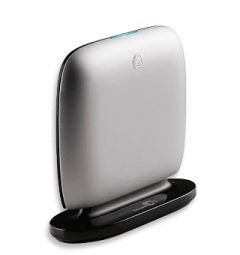
* Multi-PC version includes a convenient vertically standing dock.

Weighing in at less than a pound and only slightly larger than a pack of cards, this featherweight device manages to pack quite a punch.

The Replica comes with bare-bones software and strikes a good balance between peace of mind and individual-user control. Seagate provides a USB 2.0 cable, recovery guide and recovery CD.

After the hard drive is plugged in, it checks for updates to the Replica software, downloads the most current version and starts mirroring your computer’s content. The startup process is short, taking only a couple of minutes, though the actual backup is a time-gobbling endeavor taking about 4 hours to transfer 130 GB of data. A blue light on the top of the Replica’s case blinks continuously while data is being transferred, making it easy for you to go about your other business while it works in the background. It’s also stealthy for a hard drive, emitting only a quiet whir when working at full speed.

http://www.seagate.com/www/en-us/products/external/replica/

replica_right_01_320x340.png

Apple voids warranties over cigarette smoke, users say • The Register

Apple voids warranties over cigarette smoke, users say

No repairs for “biohazard” Macs

By Cade Metz in San Francisco

Posted in PCs & Chips, 22nd November 2009 06:13 GMT

A Mac user claims that Apple voided her warranty and refused to repair her machine because it was “contaminated” with cigarette smoke.

The claim mirrors a similar report from last year, when another user complained that the Jobsian cult wouldn't service a system due to the “health risks of secondhand smoke.”

Both complaints arrive by way of The Consumerist, a site obsessed with consumer empowerment. According to the site, the claims come from separate parts of the country and were reported more than a year apart.

In each case, the site says, an Apple service center agreed to repair a machine before telling the owner repairs were not possible because the system contained some sort of smoke residue. “They informed me that his computer can't be worked on because it’s contaminated,” wrote one woman in a complaint about Apple’s treatment of the iMac her son used.

“When I asked for an explanation, she said he’s a smoker and it’s contaminated with cigarette smoke which they consider a bio-hazard! I checked my Applecare warranty and it says nothing about not honoring warranties if the owner is a smoker. The Applecare representative said they defer to the technician and my son’s computer cannot be fixed at any Apple Service Center due to being listed a bio-hazard.”

Indeed, the warranty does not include mention of either secondhand smoke or biohazards. It does say that the plan does not cover “damage to the covered equipment caused by…extreme environment,” but both Consumerist claims indicate systems failures weren’t necessarily related to smoke residue. One user even says that smoke residue was falsely identified.

Both users appealed directly to the office of Steve Jobs. According to one, the office confirmed that the cult would not repair machines showing signs of smoke residue. “[A person from Jobs’ office] did advise me that nicotine is on OSHA [Occupational Safety and Health Administration]’s list of hazardous substances and Apple would not require an employee to repair anything deemed hazardous to their health,” the user said.

Apparently, the Jobsian office worker contacted the Apple Store in question to see about a possible repair – before calling back to say it was out of the question. “[The worker] called me earlier this week to deliver the ‘bad news.’ She said that the computer is beyond economical repair due to tar from cigarette smoke! She said the hard drive is about to fail, the optical drive has failed and it isn’t feasible to repair the computer under the warranty.

“This computer is less than 2 years old! Only one person in my household smokes – one 21 year old college student. She said that I can get it repaired elsewhere at my expense. I asked why my warranty didn’t cover the repair and was told it’s an OSHA violation.”

via Apple voids warranties over cigarette smoke, users say • The Register.

Dangerous “unpatchable” flaw discovered in Adobe Flash – TechSpot News

A newly discovered flaw in the Flash suite could put both users and servers at risk, according to some recent reports. Adobe has verified the hole, which lies inside any Flash-based application that allows people to upload their own content. Though some details are omitted, the flaw would allow someone to upload a malicious Flash object to a site, which in turn would be downloaded and processed by people visiting the site. According to one security expert, any site relying on user uploads through Flash could be vulnerable.

Adobe is contending that it is not entirely their issue. Other active scripting could also be made vulnerable, such as JavaScript or Silverlight, along with any site that relies on these to provide a mechanism for users to upload files. Because of that, Adobe said the problem is not fixable through a Flash update. Instead, it is on the shoulders of administrators whose servers use Flash. Adobe also suggests it is the responsibility of app developers to be security-minded and prevent this sort of thing from happening.

This isn’t the first severe flash flaw to emerge this year. Only a few months ago, a “critical” vulnerability was discovered and published. Earlier in the year, Adobe was tackling a host of other security issues with Flash as well. This newly-discovered vulnerability could prove to be the worst yet — and it doesn’t help that Adobe is claiming the flaw is “unpatchable”. A solution must be discovered, but it may be something that has to happen on a developer, browser or OS level instead of through Flash.

The only current defense users can employ against such attacks is to stop using Flash, or failing that, restrict its use to sites known to be safe with tools such as the NoScript add-on for Mozilla’s Firefox, or ToggleFlash for Microsoft’s Internet Explorer.

via Dangerous “unpatchable” flaw discovered in Adobe Flash – TechSpot News and
Flash flaw puts most sites, users at risk, say researchers

The “Noteable” Mousepad

Such a simple idea, but a wonderful one. Not sure if you have to wipe out the marks left by the mouse but if you keep your mouse to half of it, you can scribble on the other half and then just lift the top sheet to wipe it out and start again. And, it’s under $15.00

The Noteable Mousepad – http://www.quirky.com/products/9

Scratch-n-Scroll is a standard mousepad with an added writing surface. This mousepad is for all those times you are working at your desk and cant find a pen to jot down that phone number or list item you know you will forget later on.

Simply, write notes to yourself on your mouse pad using just the pressure from your finger or the built in plastic stylus as a “pen.” Cool thing is, just like your childhood toy the magic slate, you can erase the notes at any time simply by flipping up the semi-transparent top sheet.

Scratch-n-scroll maintains the slim portable design and scrolling surface you’ve come to expect of a standard mousepad, and works in conjunction with any optical / ball based computer mouse. It features a non-slip back pad ensuring that it stays put on your desktop while in use.

scratch-n-scroll.jpg

Nokia Recalls 14 Million AC Adapters – Gearlog

Anyone who bought a Nokia cell phone recently listen up: Nokia has just launched a recall program for certain Nokia-branded AC adapters.

“We have determined that the plastic covers of the affected chargers could come loose and separate, exposing the charger’s internal components and potentially posing an electric shock hazard if certain internal components are touched while the charger is plugged into a live socket.”

Sounds fun. Engadget Mobile reports that the affected chargers are models AC-3E and AC-3U, manufactured between June 15 and August 9, 2009, and model AC-4U, manufactured between April 13 and October 25, 2009. Check out Nokia’s dedicated recall Web site for more information on obtaining a free replacement.

via Nokia Recalls 14 Million AC Adapters – Gearlog.

What Did He Mean By That? SMS and E-mail Etiquette

The other day I was reminded of how important it is when e-mailing or texting that you make yourself “understood”. What I mean by that is when e-mailing or texting, what you write is left to the recipient to interpret the mood or intent of the words. Sometimes the words are taken the wrong way.

I received a request to do something via text and it was followed up a few minutes later with another request by the same person for the same thing. I hadn’t had time to reply to the first text so I jokingly sent out a reply to the second letting the person know that I’d get right on that request. Since it wasn’t anything important that needed to be done right away, and they knew that as well, I thought the reply would be taken good naturedly. Well, it wasn’t. Not sure if the person was having a bad day or not, but they let me know that they weren’t real happy with my flippant reply. When I let them know that it wasn’t meant to be flippant, they let me know that sometimes their phone sends messages twice when they only mean to send it once. Communication breakdown? Yes, but also a good reminder that when e-mailing and texting, there is etiquette to follow:

  • Be wary of the reply all button. Most of the time you would only want to reply to the sender, not to everyone on the list.
  • Don’t type in all caps. That’s the equivalent of shouting. Not nice.
  • Watch for excessive punctuation. There is no need to put 5 exclamation marks at the end of a sentence!!!!! And I mean it.
  • Acronyms. Don’t assume that everyone is going to know what ROTFL (rolling on the floor laughing) or TNSTAAFL (there’s no such thing as a free lunch) means. There are some common abbreviations, such as BTW (by-the-way) and FYI (for your information) but some of the others, well, write the words. If you need to find out what something means, check the Acronym List.
  • Let them know how you feel. What happened to me the other day could have been avoided if I had included a smiley with my reply. These need to be added with care, as in less is more, but in this instance, adding one would have let the other person know that I was saying it light-heartedly. Part of the nature of a good one-on-one conversation are the use of visual cues. Since there are no visual or auditory cues with e-mail or texts, users have come up with something called “smilies”. They are simple strings of characters that are typed in the e-mail text to convey your emotions or meaning. The most common example is :-).  Here are some more examples.  – Smileys and Emoticons. Use them to let the other person know what you mean. 😉
  • When forwarding on an e-mail, remove the e-mail addresses that are on the original e-mail. Highlight and delete them before you send. That puts the text that you want read at the top of the e-mail and removes unwanted items. I don’t need to see who the e-mail was sent to before me.
  • Scan through your text or e-mail before you press Send. Check the recipients to make sure that it’s going to the right person(s). See if there are parts that shouldn’t be said or should possibly be said differently. If there needs to be a smiley inserted to clarify intent, do so.

The internet’s 40th birthday: anniversary of Arpanet – Telegraph

On 29 October 1969, two letters – LO – were typed on a keyboard in the University of California, Los Angeles (UCLA), and appeared on a screen at the Stanford Research Institute, 314 miles away.

The computer scientists had intended to type LOGIN, but the connection was lost just before the G. Nonetheless, this was the first time a message had been sent over a telephone line between two computers.

It was not called the internet – that name was not coined for another five years. It was called Arpanet, for Advanced Research Projects Agency Network, and was developed by scientists in the US Defense Department.

Nor was it the World Wide Web – that was created by the British scientist Tim Berners-Lee, now Sir Tim Berners-Lee, at Cern, the Geneva physics laboratory that now houses the Large Hadron Collider, 20 years ago in March.

And email had existed for a few years before that, between different terminals on single mainframes; the first true email sent between different computers was not sent until 1971.

But 29 October is as good a birthday as any. Those two letters, typed by an undergraduate at UCLA called Charley Kline on an “interface message processor”, were the precursors of everything from the eBay Buy It Now button to LOLcats, Kara’s Adult Playground (we won’t link to that) to Google Wave.

They say life begins at 40. It will be extremely interesting to see where the next 40 years take us.

via The internet’s 40th birthday: anniversary of Arpanet – Telegraph.

Fake security software in millions of computers: Symantec by Reuters: Yahoo! Tech

There’s a lot of money to be made in malware. That’s what keeps it going….

WASHINGTON (Reuters) –

Tens of millions of U.S. computers are loaded with scam security software that their owners may have paid for but which only makes the machines more vulnerable, according to a new Symantec report on cybercrime.

Cyberthieves are increasingly planting fake security alerts that pop up when computer users access a legitimate website. The “alert” warns them of a virus and offers security software, sometimes for free and sometimes for a fee.

“Lots of times, in fact they’re a conduit for attackers to take over your machine,” said Vincent Weafer, Symantec’s vice president for security response.

“They’ll take your credit card information, any personal information you’ve entered there and they’ve got your machine,” he said, referring to some rogue software’s ability to rope a users’ machine into a botnet, a network of machines taken over to send spam or worse.

Symantec found 250 varieties of scam security software with legitimate sounding names like Antivirus 2010 and SpywareGuard 2008, and about 43 million attempted downloads in one year but did not know how many of the attempted downloads succeeded, said Weafer.

“In terms of the number of people who potentially have this in their machines, it’s tens of millions,” Weafer said.

It was also impossible to tell how much cyberthieves made off with but “affiliates” acting as middlemen to convince people to download the software were believed to earn between 1 cent per download and 55 cents.

TrafficConverter.biz, which has been shut down, had boasted that its top affiliates earned as much as $332,000 a month for selling scam security software, according to Weafer.

“What surprised us was how much these guys had tied into the whole affiliated model,” Weafer said. “It was more refined than we anticipated.”

(Reporting by Diane Bartz; editing by Gunna Dickson)

via Fake security software in millions of computers: Symantec by Reuters: Yahoo! Tech.

Setting a Default Program to Open a File

I received a call today from someone who was having problems opening a pdf file. Whenever she clicked on it, it would open in WordPad, even though she had Adobe Reader installed. She said she could could right-click on it and choose Adobe Reader from the list and it would open but when she double-clicked on it, it would still open in WordPad.

I knew right away what had happened, and it’s very easy to fix. What happened was that she received a pdf file but hadn’t yet downloaded and installed Reader. When she tried to open the pdf, the computer couldn’t associate it with the correct program so it prompted her to choose a program. WordPad was suggested so she took it. That automatically associated the opening of pdf files with WordPad. It didn’t matter that she later installed Reader.

This file association also occurs when installing some programs, especially media programs. If you choose the default installation, many times that program will associate all media files to open it that program, even if you don’t want it to. I always choose the Custom Installation option so I have more control over what gets installed and where.

Anyhow, back to the situation at hand…How to change the association so that her pdf’s open with Reader. There’s a long, involved, confusing way to do it, and then there’s a much quicker and easier way. I’ll cover the quicker and easier way.

I had her right-click on a pdf file she had on her computer and had her left-click on “Open With”.  This brought up a list of programs that she could choose to try to open the file with. I had her click on “Choose Program” or “Choose Default Program” depending on your Windows version. Under Recommended Programs, Adobe Reader was listed so I had her select that and then check the box at the bottom next to Always use the selected program to open this kind of file. If the Program you need isn’t listed under Recommended Programs, you may find it under Other Programs or you may have to Browse for it, but always check the box at the bottom when you find the correct program.

That tells Windows what program to associate that type of file with. Now, when she double-clicks a pdf file from her computer, or opens a pdf attachment from e-mail, it always opens in Adobe Reader.

This will work with any file type you need to associate, or re-associate with a program.