• by Bill Jimenez

  • Schedule Remote Computer Support

  • Recent Posts

  • Archives

  • Pages

Email: Spam, Virus or Clean?

Not sure if you’ve noticed, but there are a lot of emails being received that have a few lines of gibberish followed by a hyperlink, and often times a nice motivational quote. Many times, these emails are coming from someone you know. How are these emails getting past the spam and virus filters you have in place? Why isn’t your antivirus program stopping them?

Well, first, most of these emails are coming through as plain text, with no formatting like HTML emails have. Spam filters usually are looking for key words, phrases, or graphics. With these emails, often times there aren’t any “key” words that will trigger the filter. As for the virus, there usually aren’t any attachments, just a hyperlink, again, nothing that will trigger the filter.

The following is a sample of a text based email with normal words and a hyperlink. Also note that it’s not addressed to me but I received it anyway so it must have gone out to a group. Click on the examples that follow to see them full screen. They will open in a new window so when you’re ready to move back to the article, just close the image window.

It’s a lot more difficult getting an HTML formatted email through spam filters but some do get through. The following is an example for comparison sake between an HTML format and Text Only format:

And then there is the email trying to convince you that it’s okay to open the attachment to print or verify the information they’re telling you about in the email. In this case, the email is stating that I paid property tax on property in King County, where ever that is. Since I don’t remember doing that, maybe I should print the document to see what they’re talking about. Well, wouldn’t you? Except for the fact that none of the reference numbers match up, from the payment confirmation to the reference number to the number on the attachment, none match. Notice also that the attachment is zipped. This is a common method of hiding a virus to get it past the filters.
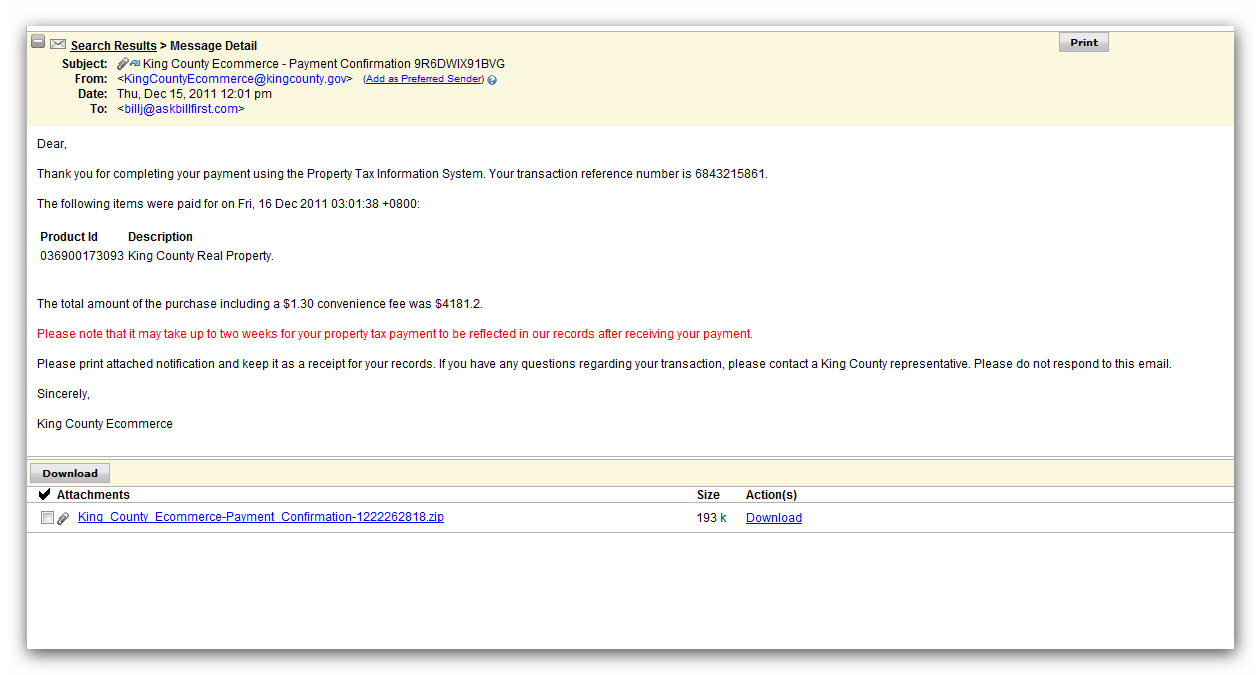
 

Well, I didn’t open it. It forwarded it on to scan@virustotal.com and in less than 5 minutes, I received the following report. Note that virustotal scanned the file against 40 some antivirus engines and most came back with no virus found…but 4 of them did find something. That was good enough for me. I deleted the email.

Image

I hope this helps clarify those emails you’ve been getting.

Oh, and by-the-way, if you get an email similar to the ones above from a friend, have them change their email program’s password as it’s possible that their email program has been hijacked.

Maybe My Password Isn’t As Strong As I Thought It Was

For years, we in the computer industry, have been telling people to create cryptic passwords that include upper and lowercase letters, numbers, and special characters. We’ve been saying that if you replace certain characters with others, such as @ instead of “a”, or 3 instead of “E”, or ! instead of l, that chances of getting your password stolen are remote. Well, it would be remote, but with today’s technology, someone trying to break that password would have it figured out in 3 days with 1000 guesses/second, which is probably faster than you trying to remember what the password actually is.

A far better and safer way to create passwords is to string words together. Four random words, such as dogsbakewoodseat, would take 550 years with 1000 guesses/second to break, and would be much easier to remember if you use words that have meaning to you. The reason isn’t so much in the letters you use but is a combination of length as well as content. Most cryptic passwords are shorter than 8 characters because they’re hard enough to remember as is without them being longer. By using the word combination, you can make your passwords long and still be easy to remember.

I still recommend you using a different password for every site so with all of those passwords to try to remember you may want to use a password manager. I recommend RoboForm which allows you to save your passwords to your computer, or to the internet where they’re available just by clicking, when you need to log-in to a site.

If you want to see how safe some of your passwords are, or passwords similar to what you use, try them here, and see how long it would take someone to hack your password.

Fake Antivirus Industry Down, But Not Out — Krebs on Security

Fake Antivirus Industry Down, But Not Out — Krebs on Security.

Many fake antivirus businesses that paid hackers to foist junk security software on PC users have closed up shop in recent weeks. The wave of closures comes amid heightened scrutiny by the industry from security experts and a host of international law enforcement officials. But it’s probably too soon to break out the bubbly: The inordinate profits that drive fake AV peddlers guarantee the market will soon rebound.

During the past few weeks, some top fake AV promotion programs either disappeared or complained of difficulty in processing credit card transactions for would-be scareware victims: Fake AV brands either ceased operating or alerted affiliates that they may not be paid for current and future installations.

On July 2, BestAV, one of the larger fake AV distribution networks, told affiliates that unforeseen circumstances had conspired to ruin the moneymaking program for everyone.

Google: Your Computer Appears to Be Infected

From KrebsOnSecurity

Google last week began warning more than a million Internet users that their computers are infected with a malicious program that hijacks search results and tries to scare users into purchasing fake antivirus software.

Google security engineer Damian Menscher said he discovered the monster network of hacked machines while conducting routine maintenance at a Google data center. Menscher said when Google takes a data center off-line, search traffic directed to that center is temporarily stopped. Unexpectedly, Menscher found that a data center recently taken off-line was still receiving thousands of requests per second.

Menscher dug further and discovered the source of the traffic: more than a million Microsoft Windows machines were infected with a strain of malware designed to hijack results when users search for keywords at Google.com and other major search engines. Ironically, the traffic wasn’t search traffic at all: The malware instructed host PCs to periodically ping a specific Google Internet address to check whether the systems were online.

For the rest of the article, please click here

NOTE: Unlike the scareware and fake anti-virus programs that “popup” on your screen, this is  a banner notice at the top of your search results. Use your own anti-virus programs to scan your computer as well as programs such as SuperAntiSpyware and Malwarebytes


Ah, Cookies

Tracking cookies

The other day I noticed that I was running out of space on the hard disk of my computer. I went through and removed some programs and moved some data to an external drive to free up some space, but the next day, the space was low again.

I ran my normal cleanup software, CCleaner, SuperAntiSpyware and Malwarebytes and found that I had a huge number of tracking cookies on my computer.

If you don’t know, most every website you visit downloads a small file to your computer, called a cookie. Cookies are set to stay on your computer for a period of time and contain information about the site you’re on. Often times, they will hold your login information to the site so that the next time you visit that site, you’ll automatically be logged in, or your preferences will be recorded and remembered so that you won’t have to reset everything time and again.

Tracking cookies, on the other hand, aren’t good. Websites sometimes allow third parties, such as advertisers and marketers, to also install what’s known tracking cookies on your computer. These cookies send information back to the marketing companies where your preferences are put in a database for future use. They don’t record personal information, such as credit card numbers or passwords but general information about your surfing habits and preferences. What they hope to do is to have the advertisements that you see on a page become advertisements that relate more specifically to you so that you’ll click and buy. The danger comes when that information, which is connected to you, becomes available to others.

So, what to do? You really need the main cookies a site saves because a lot of sites won’t work well unless you accept the cookies. Third party cookies, however, aren’t needed and should be blocked.

There are settings in each of the browsers that allow you to allow the main cookies and block the third party cookies. Here are the instructions to do so for the four main browsers:

Internet Explorer –

  • Open Tools, Internet Options | Privacy, click on the Advanced button.
    • Place a check in “Override automatic cookie handling”.
      Uncheck “Always allow session cookies“
    • Set “First Party Cookies” to Accept, set “Third Party Cookies” to Block.

Firefox –

  • At the top of the Firefox window, click on the Firefox button (Tools menu in Windows XP) and then click Options. On the menu bar, click on the Firefox menu and select Preferences…At the top of the Firefox window, click on the Edit menu and select PreferencesAt the top of the Firefox window, click on the Tools menu and select Options…On the menu bar, click on the Firefox menu and select Preferences…At the top of the Firefox window, click on the Edit menu and select Preferences…
  • Select the Privacy panel.
  • Set Firefox will: to Use custom settings for history.
  • Uncheck Accept third-party cookies.

Chrome –

  • Click the wrench icon on the browser toolbar.
    • Select Options (Preferences on Mac and Linux; Settings on Chrome OS).
    • Click the Under the Hood tab.
    • Click Content settings in the “Privacy” section.
    • Click the Cookies tab in the Content Settings dialog that appears:

o   Block only third-party cookies: Select the “Ignore exceptions and block third-party cookies from being set” checkbox. Even if you’ve added a site to the Exceptions list and have chosen to allow its cookies, the site’s third-party cookies won’t be accepted if this checkbox is selected.

Safari –

  • From Safari, select “Safari” in the menu bar, and then select “Preferences”
  • In the Preferences Dialog Box, select the “Security” tab
  • Make sure the “Accept cookies:” setting is set to “Only from sites you navigate to”. You can also set this option to “Never”, but this will prevent many web sites that rely on cookies from working.

Once I removed the tracking cookies from my computer, I actually recovered almost 200 GB of disk space. I then went through each of my browsers and blocked third party cookies from being installed.

Here’s One Reason Why You Need to Password Protect Your Wireless Router

Or if you’re using your neighbor’s wireless connection, you may want to reconsider.

To sum up, an individual in New York found himself facedown in his living room in the morning with federal agents all around him. They were accusing him of being a pedophile and pornographer. They ended up seizing his computer, his wife’s computer and iPad and iPhone. He claimed innocence and after a week, was cleared. His neighbor, however, wasn’t as lucky. Seems the neighbor was leaching off the non-password protected wireless router and trafficking child pornography.

Always, always, always password protect your router, or if you’re leaching off your neighbor, and they’re involved in something illegal, it could come back on you as well. Now here’s the article –

BUFFALO, N.Y. – Lying on his family room floor with assault weapons trained on him, shouts of “pedophile!” and “pornographer!” stinging like his fresh cuts and bruises, the Buffalo homeowner didn’t need long to figure out the reason for the early morning wake-up call from a swarm of federal agents.

That new wireless router. He’d gotten fed up trying to set a password. Someone must have used his Internet connection, he thought.

“We know who you are! You downloaded thousands of images at 11:30 last night,” the man’s lawyer, Barry Covert, recounted the agents saying. They referred to a screen name, “Doldrum.”

“No, I didn’t,” he insisted. “Somebody else could have but I didn’t do anything like that.”

“You’re a creep … just admit it,” they said.

Law enforcement officials say the case is a cautionary tale. Their advice: Password-protect your wireless router.

via NY case underscores Wi-Fi privacy dangers – Yahoo! News.

The curse of popularity: Hackers love Apple’s iPad, iPhone, too | ZDNet

As the popularity of the iPhone and the iPad – both of which run iOS – has gone mainstream, hackers are tapping iOS. And surely, they’re counting on users – who have long known about vulnerabilities to computers – to be naive about the vulnerabilities that are possible in the mobile world.

Today, Gizmodo posted an unsourced report about a security breach in iOS products that are being pushed through PDF files and the Web pages that load through the Safari browser. Gizmodo calls the vulnerability “easily exploitable” and explains that unsuspecting users who could be giving “total control” of their iPhones, iPod Touches or iPads to hackers. The blog reports:

It just requires the user to visit a web address using Safari. The web site can automatically load a simple PDF document, which contains a font that hides a special program. When your iOS device tries to display the PDF file, that font causes something called stack overflow, a technical condition that allows the secret ninja code inside the font to gain complete control of your device. The result is that, without any user intervention whatsoever, that program can do whatever it wants inside your iPhone, iPod touch or iPad. Anything you can imagine: Delete files, transmit files, install programs running on the background that can monitor your actions… anything can be done.

via The curse of popularity: Hackers love Apple’s iPad, iPhone, too | ZDNet.

Windows XP zero-day under attack; Use Microsofts “fix-it” workaround | ZDNet

Just five days after Google researcher Tavis Ormandy released details of a critical vulnerability affecting Windows XP and Windows Server 2003, malware authors have struck, exploiting the flaw to plant malware on Windows machines.The attacks, described by Microsoft as “limited,” are being distributed on rigged Web sites drive-by downloads.“Windows Server 2003 customers are not currently at risk from the Win Help issue based on the attack samples we have analyzed,” according to Microsoft’s security response center.The attacks,  are only targeting Windows XP computers with the HCP protocol enabled.

ONE-CLICK FIX-IT

In the absence of a patch, Microsoft is recommending that affected Windows customers use this one-click Fix-It tool to unregister the problematic “hcp://” protocol.

This can also be manually done by following these simple directions:

  1. Click Start, and then click Run.
  2. Type regedit, and then click OK.
  3. Expand HKEY_CLASSES_ROOT, and then highlight the HCP key.
  4. Right-click the HCP key, and then click Delete.

Impact of Workaround: Unregistering the HCP protocol will break all local, legitimate help links that use hcp://.  For example, links in Control Panel may no longer work.

via Windows XP zero-day under attack; Use Microsofts “fix-it” workaround | ZDNet.

Adobe reports critical flaw in Flash, Acrobat | Security – CNET News

Adobe has issued a security advisory about a “critical” vulnerability in its Flash Player and Adobe Reader and Acrobat products that it says could let attackers take control of peoples computers. The company said late Friday that there had been reports of the hole actually being exploited and that an official patch was not yet available. Affected software includes: Adobe Flash Player 10.0.45.2, 9.0.262, and earlier 10.0.x and 9.0.x versions for Windows, Macintosh, Linux, and Solaris, Adobe Reader and Acrobat 9.3.2 and earlier 9.x versions for Windows, Macintosh, and Unix. The company said that the Flash Player 10.1 Release Candidate does not seem to be vulnerable and that Adobe Reader and Acrobat 8.x are confirmed not vulnerable. Adobe didn’t say when an official fix would be released, but according to the company, computer users can mitigate the Flash issue by downloading the release candidate mentioned above. The Acrobat and Reader issue can be addressed by “deleting, renaming, or removing access to the authplay.dll file” that ships with those products, Adobe said. This will, however, cause a nonexploitable crash or error message if a user opens a PDF file that contains SWF content. The .dll file is typically located at C:\Program Files\Adobe\Reader 9.0\Reader\authplay.dll for Adobe Reader or C:\Program Files\Adobe\Acrobat 9.0\Acrobat\authplay.dll for Acrobat, Adobe said.The complete security advisory is available here.

via Adobe reports critical flaw in Flash, Acrobat | Security – CNET News.

Defective McAfee update causes worldwide meltdown of XP PCs | Ed Bott’s Microsoft Report | ZDNet.com

At 6AM today, McAfee released an update to its antivirus definitions for corporate customers that had a slight problem. And by “slight problem,” I mean the kind that renders a PC useless until tech support shows up to repair the damage manually. Here’s how the SANS Internet Storm Center describes the screw-up:McAfee’s “DAT” file version 5958 is causing widespread problems with Windows XP SP3. The affected systems will enter a reboot loop and [lose] all network access. We have individual reports of other versions of Windows being affected as well. However, only particular configurations of these versions appear affected. The bad DAT file may infect individual workstations as well as workstations connected to a domain. The use of “ePolicyOrchestrator”, which is used to update virus definitions across a network, appears to have [led] to a faster spread of the bad DAT file. The ePolicyOrchestrator is used to update “DAT” files throughout enterprises. It can not be used to undo this bad signature because affected system will lose network connectivity.The problem is a false positive which identifies a regular Windows binary, “svchost.exe”, as “W32/Wecorl.a”, a virus.McAfee now has its own KnowledgeBase page posted, with details about the problem and the fix. The symptoms are described, tersely, as “Blue screen or DCOM error, followed by shutdown messages after updating to the 5958 DAT on April 21, 2010.”

via Defective McAfee update causes worldwide meltdown of XP PCs | Ed Bott’s Microsoft Report | ZDNet.com.