Yes, I spelled that right. Phishing is the act of sending an e-mail to a user falsely claiming to be an established legitimate enterprise in an attempt to scam the user into surrendering private information that will be used for identity-theft. The e-mail directs the user to visit a web site where they are asked to update personal information, such as passwords and credit card, social security, and bank account numbers, that the legitimate organization already has. The Web site, however, is bogus and set up only to steal the user’s information. Phishing mail often includes official-looking logos and other identifying information taken directly from legitimate Web sites, and it may include convincing details about your personal information that scammers found on your social networking pages.
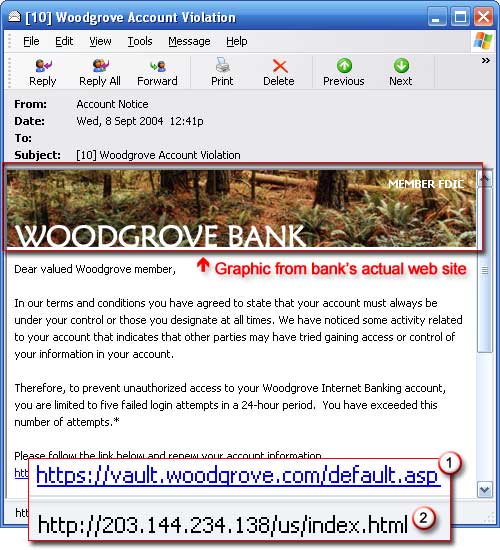
The following is a sample e-mail. As you can see, it’s not obvious at first that this is a fake. It has the bank’s logo at the top and looks legitimate but what gives this one away is the link at the bottom. The posted link (1) shows the real site but if you click on that link you’ll be taken to the site of the 2nd link (2), which is the scam site.
Fake E-mail
How can you be sure about the accuracy of a link? In just about every e-mail that has a link, when you hover your mouse arrow over the link without clicking, a pop-up window will show you the actual site that you will be taken to if you click on the link. If it doesn’t match the link shown, be wary.
So what do you do if you get an email that looks legitimate but is asking for you to click on a link to enter personal information or verify your personal information? Don’t click on the links within emails that ask for your personal information. Fraudsters use these links to lure people to phony Web sites that look just like the real sites of the company, organization, or agency they’re impersonating. If you follow the instructions and enter your personal information on the Web site, you’ll deliver it directly into the hands of identity thieves. To check whether the message is really from the company or agency, call the company directly or go to its web site by typing the real address in your browsers address bar, but never click on the link.
Filed under: Instructional, Quick Wins, Stay Safe | 1 Comment »